

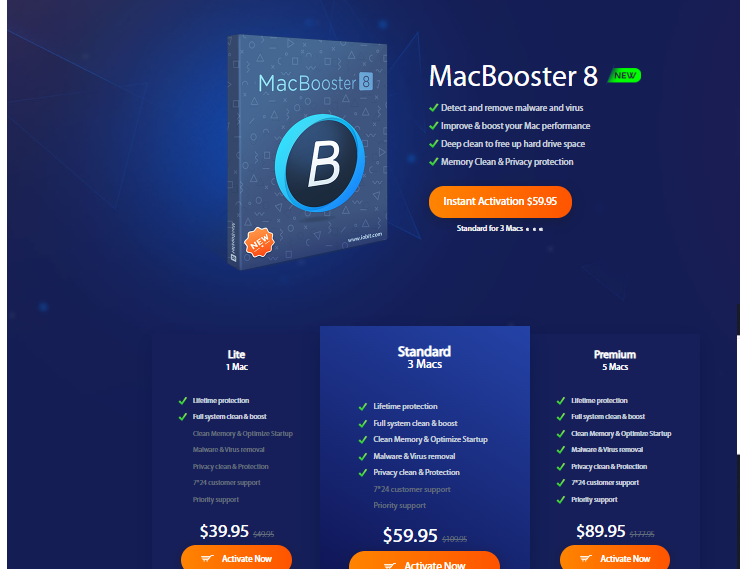
Keeping your Mac fast and clutter-free becomes more difficult over time. Cached files, leftover app data, duplicate files, and startup programs can slowly reduce performance. This is why many users search for the best Mac cleaner and optimization software. One popular option is MacBooster 8, a Mac maintenance tool designed to clean junk files, improve system performance, and offer basic malware protection.
In this detailed MacBooster 8 review, we will explore its features, benefits, drawbacks, pricing, and whether it is worth using in 2025.
What Is MacBooster 8?
MacBooster 8 is a Mac optimization and cleaning software developed by IObit. It is designed to help Mac users maintain their systems by removing unnecessary files, managing startup items, detecting malware, and improving overall performance.
Unlike built-in macOS tools, MacBooster combines multiple maintenance features into one application, making it suitable for users who want a simple and centralized solution for Mac cleanup and optimization.
Key Features of MacBooster 8
Mac Junk Cleaner
One of the main reasons users install MacBooster is its junk cleaning capability. The software scans your Mac for cache files, log files, unused language files, broken downloads, and other system junk. Removing these files helps free up disk space and can improve system responsiveness, especially on Macs with limited storage.
Malware and Virus Protection
MacBooster includes a malware scanner that searches for malicious files, tracking cookies, and potential threats. While it should not replace a full antivirus program, it does add a layer of security for users who want basic malware detection as part of their Mac maintenance routine.
Performance Optimization
MacBooster offers several performance tools, including memory cleaning, system optimization, and disk permission repair. It also allows users to control startup applications, helping reduce boot time and improve overall speed. These features are useful for Macs that feel slow or take too long to start.
Duplicate File Finder
The duplicate file finder scans your Mac for duplicate documents, videos, and images. This is especially helpful for users with large media libraries. The tool allows manual review before deletion, which is important to avoid removing important files by mistake.
App Uninstaller
MacBooster includes an app uninstaller that removes applications along with their leftover files. This is more effective than dragging apps to the Trash, as it ensures related files are also deleted, freeing additional space.
Privacy Protection
The software provides privacy cleaning tools that remove browser history, cookies, and tracking data. This helps protect personal information and improve browsing privacy.
MacBooster 8 Pricing and Plans
MacBooster is usually available in multiple plans, including single Mac and multi-Mac licenses. Lifetime license options are often promoted at discounted prices. While lifetime access can be appealing, users should compare the cost with alternative Mac cleaning tools to determine the best value for their needs.
Pros of MacBooster 8
MacBooster offers a wide range of Mac maintenance tools in one application. It is easy to use, even for beginners, and the interface is clean and well organized. The junk cleaner and duplicate file finder are particularly useful for freeing disk space. A money-back guarantee is typically included, allowing users to test the software with low risk.
Cons of MacBooster 8
Although MacBooster includes malware scanning, it does not offer the same level of protection as dedicated antivirus software. Some optimization features may have limited impact on newer versions of macOS, which already manage memory efficiently. Pricing may feel high for users who only need basic cleanup tools, and some users report aggressive upgrade prompts.
MacBooster vs Other Mac Cleaner Software
When compared to other Mac cleaner tools such as CleanMyMac, MacBooster provides similar functionality but with differences in interface, pricing, and depth of features. CleanMyMac is often praised for its polish and advanced malware protection, while MacBooster appeals to users who want strong cleanup tools and lifetime license options.
Lightweight Mac cleaners may be more affordable for users who only need junk removal, while advanced users may prefer combining manual macOS tools with specialized security software.
Is MacBooster 8 Worth It?
MacBooster 8 is a solid choice for users looking for an all-in-one Mac cleaner and optimization tool. It is particularly useful for freeing up disk space, managing startup programs, and performing routine maintenance without technical complexity.
However, users who prioritize advanced security or premium system monitoring may want to consider alternatives or pair MacBooster with a dedicated antivirus solution.
Final Thoughts
MacBooster 8 remains a competitive Mac optimization tool in 2025. It offers a good balance of system cleanup, performance improvement, and basic security features. For users who want a simple and effective way to keep their Mac running smoothly, MacBooster is worth considering.
If your goal is to clean junk files, speed up your Mac, and manage system clutter from one dashboard, MacBooster 8 can be a practical solution.